Writeup | Email & Infrastructure
Self-Hosted Email on Residential Internet
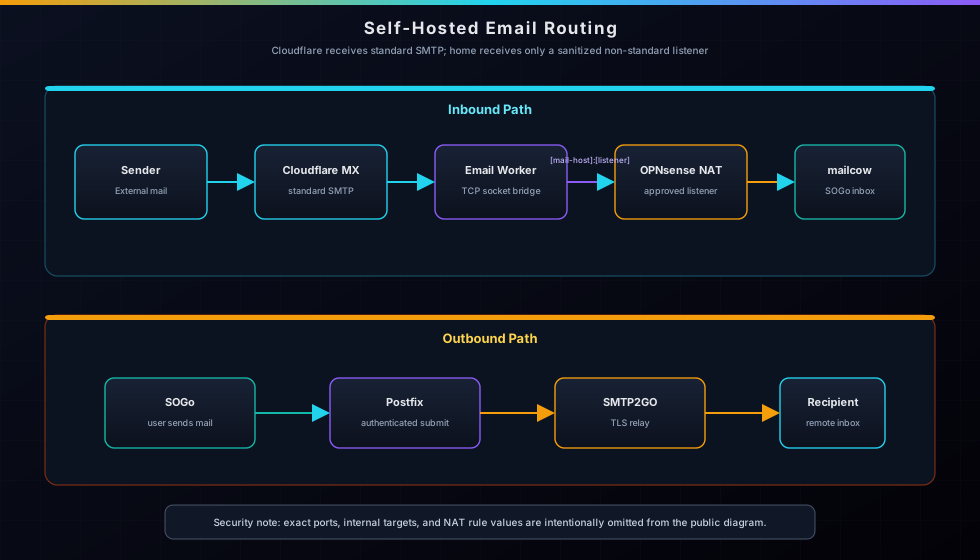
The ISP blocks standard inbound SMTP. The obvious workarounds either cost money or don't deliver raw SMTP to a custom port. Ended up writing a Cloudflare Email Worker using the TCP sockets API as a zero-cost SMTP bridge — no VPS, no third-party relay, email lands directly in a self-hosted mailcow inbox.
STAR Breakdown
- Situation: Running mailcow-dockerized on a residential ISP connection that hard-blocks standard inbound SMTP — common policy across most residential providers with no exceptions. A self-hosted email stack is useless if it can't receive mail.
- Task: Get inbound email delivering directly into mailcow's SOGo webmail interface for
admin@masternazz.com, with working outbound relay — using only free infrastructure already in the stack. - Action: Evaluated 8+ options including paid relays, webhook services, and Cloudflare Tunnel TCP. Landed on Cloudflare Email Workers with the
cloudflare:socketsTCP API — wrote a Worker that receives email on Cloudflare's MX servers and opens a raw SMTP connection to home on a non-standard listener. Fixed OPNsense NAT destination aliasing bug that blocked all inbound. Configured SMTP2GO for outbound relay, set up full SPF/DKIM/DMARC authentication, and resolved SOGo sending config. - Result: End-to-end email working: inbound via Cloudflare Worker → mailcow internal SMTP listener → dovecot inbox, outbound via SMTP2GO with
dkim=pass,spf=pass,dmarc=pass— zero cost beyond existing infrastructure.
The Constraint
Residential ISPs block standard inbound SMTP. Not throttled — blocked. No exceptions. This is standard practice across most residential providers to prevent residential IPs from being used as spam sources. For self-hosted email it means you can run the full stack — postfix, dovecot, rspamd, SOGo — but no external mail server in the world will be able to deliver to you directly.
The naive fix is rent a small VPS with standard SMTP open and use it as a relay. That works but introduces a dependency and recurring cost. The interesting constraint: can it be solved for free using infrastructure that's already running?
Options Evaluated
Before building anything, every realistic option was mapped out:
- SMTP2GO inbound routing — free plan doesn't include inbound. Paid tier only.
- Cloudflare Email Routing forward rules — can only forward to email addresses, not to a raw SMTP host:port.
- Cloudflare Tunnel TCP — tunnels support arbitrary TCP, but Cloudflare blocks standard outbound SMTP on their network to prevent abuse. The tunnel registers fine, but mail never flows.
- Mailgun / Resend inbound — free tiers exist, but both deliver via HTTP webhook, not raw SMTP relay. Would require a separate listener to consume the webhook and re-inject into mailcow.
- ImprovMX / Forward Email — free tiers only forward to email addresses. Custom SMTP relay is paid.
- Dynu Email Store/Forward — $9.99/year, supports custom ports natively. Viable if free wasn't an option.
- Hetzner VPS — ~€3.29/month. Clean and simple but recurring cost.
- Cloudflare Email Workers + TCP socket API — Cloudflare Workers can open outbound TCP connections to arbitrary hosts and ports using the
cloudflare:socketsconnect()API. Standard outbound SMTP is blocked, but a non-standard listener can be reached.
The last option is the only free path that delivers raw SMTP to a custom port. Cloudflare handles standard SMTP reception on their global network, and the Worker opens a TCP socket to home on a non-standard listener the ISP doesn't block.
The Architecture
Inbound path
Sender
  → Cloudflare MX (route1/2/3.mx.cloudflare.net) — receives standard SMTP
  → Cloudflare Email Routing triggers Worker
  → Worker opens TCP socket to [mail-host]:[nonstandard-smtp-listener]
  → Worker performs full SMTP handshake (EHLO / MAIL FROM / RCPT TO / DATA)
  → mailcow postfix receives on a plain-SMTP listener
  → postfix delivers via LMTP to dovecot
  → Email lands in SOGo inbox
Outbound path
SOGo webmail
  → postfix authenticated submission
  → SMTP2GO authenticated relay
  → Delivered to recipient
SMTP2GO's alternative TLS submission endpoint is used because standard submission egress can also be filtered on residential connections.
The NAT Bug That Blocked Everything
Before the Worker could be tested, inbound ports weren't responding at all. Nmap against the
public IP showed every port as closed. The OPNsense NAT rules existed — they
were just silently not matching.
The root cause: OPNsense's destination NAT rules were configured with
destination = wanip. The wanip alias in pf resolves to OPNsense's
WAN interface IP — the address assigned by the modem on its LAN side, not the public IP.
Traffic arriving from the internet carries the public IP as the destination — pf checks it
against the modem-side WAN IP and the rule doesn't match.
The modem is in DMZ mode, so all traffic passes through. The fix: change the destination in
every NAT rule from wanip to "" (any). After the change, nmap
immediately showed the expected public mail and submission endpoints as open.
# OPNsense d_nat MVC API — correct destination for NAT behind CGNAT/DMZ
# destination.network must be "" (any), NOT "wanip"
# wanip = modem-side private address, NOT the public IP
# Traffic from internet arrives destined for the public IP — wanip never matches

POST /api/firewall/d_nat/addRule
{"rule": {"interface": "wan","protocol": "tcp",
  "destination": {"network": "","port": "[nonstandard-smtp-listener]"},
  "target": "[mailcow-internal-ip]",
  "local-port": "[nonstandard-smtp-listener]"}}
Plain SMTP Listener
mailcow's postfix already has an internal listener for proxy traffic, but that listener uses the HAProxy protocol
(postscreen_upstream_proxy_protocol=haproxy). A Cloudflare Worker speaking
plain SMTP to a HAProxy-protocol listener gets rejected immediately because the connection
doesn't start with a HAProxy header.
The fix is a new listener in master.cf for plain SMTP on a non-standard port, with
rspamd/milter disabled (the Worker is relaying already-scanned mail from Cloudflare's
infrastructure) and a permissive recipient restriction that accepts mail for local domains:
# /opt/mailcow-dockerized/data/conf/postfix/master.cf
[nonstandard-smtp-listener]      inet  n       -       n       -       -       smtpd
  -o smtpd_sasl_auth_enable=no
  -o smtpd_client_restrictions=permit_mynetworks,permit_inet_interfaces,reject_unauth_pipelining
  -o smtpd_recipient_restrictions=permit_mynetworks,reject_unauth_destination
  -o smtpd_relay_restrictions=permit_mynetworks,reject_unauth_destination
  -o smtpd_milters=
  -o non_smtpd_milters=
  -o syslog_name=postfix/smtp2go
The port is exposed via docker-compose.override.yml so Docker publishes it
without touching the main compose file:
# /opt/mailcow-dockerized/docker-compose.override.yml
version: '2.1'
services:
  postfix-mailcow:
    ports:
      - "[nonstandard-smtp-listener]:[nonstandard-smtp-listener]"
The Cloudflare Email Worker
The Worker is the core of the solution. Cloudflare Email Routing has supported routing to
Workers since 2023 — instead of forwarding to an email address, the email is handed to a
Worker script as a message event. The Worker receives the raw RFC 5322 message
and can do anything with it.
The cloudflare:sockets module provides a connect() function that
opens a TCP socket to any host and port. Standard outbound SMTP is blocked by Cloudflare
for anti-spam reasons, but the private listener can be reached. The Worker opens the socket, reads the SMTP banner,
and implements a minimal SMTP client:
import { connect } from "cloudflare:sockets";

export default {
  async email(message, env, ctx) {
    const rawEmail = await streamToArrayBuffer(message.raw, message.rawSize);
    await relayToMailcow(message.from, message.to, rawEmail);
  },
};

async function relayToMailcow(from, to, rawEmail) {
  const socket = connect({ hostname: env.SMTP_HOST, port: Number(env.SMTP_PORT) });
  const writer = socket.writable.getWriter();
  const reader = socket.readable.getReader();
  // ... SMTP handshake: read banner, EHLO, MAIL FROM, RCPT TO, DATA, body, QUIT
}
One implementation detail worth noting: the TCP socket reader returns arbitrary chunks,
not lines. A naive line-by-line reader that waits for \n will stall waiting
for bytes that already arrived in a previous chunk. The correct approach is to buffer
incoming data and scan for complete SMTP response lines (3-digit code + space = final
line of a response) across chunk boundaries.
The SMTP DATA body also requires dot-stuffing — any line starting with .
must be escaped as .. per RFC 5321, otherwise the server interprets the
first . as the end-of-data marker.
Outbound: SMTP2GO Relay
For outbound, mailcow's postfix is configured with an SMTP relay pointing to
SMTP2GO. The relay credentials are stored in mailcow's MySQL relayhosts table.
SMTP2GO's free tier allows 1,000 emails/month over authenticated TLS submission — enough for personal use.
Before SMTP2GO will accept outbound mail from a domain, it requires sender domain verification. Three CNAME records are added to Cloudflare DNS:
em1130939.masternazz.com→return.smtp2go.net(bounce handling)s1130939._domainkey.masternazz.com→dkim.smtp2go.net(SMTP2GO DKIM)link.masternazz.com→track.smtp2go.net(tracking domain)
mailcow generates its own DKIM key pair via its API and signs all outgoing mail with
selector dkim. Outgoing emails end up with three DKIM signatures: one from
mailcow (d=masternazz.com s=dkim), one from SMTP2GO
(d=masternazz.com s=s1130939), and one from SMTP2GO's own infrastructure
(d=smtpservice.net). Gmail validates all three as dkim=pass.
Authentication Results
The authentication header on a delivered email confirms everything is working:
Authentication-Results: mx.google.com;
  dkim=pass header.i=@smtpservice.net header.s=a1-4;
  dkim=pass header.i=@masternazz.com header.s=s1130939;
  dkim=pass header.i=@masternazz.com header.s=dkim;
  spf=pass smtp.mailfrom="bounce...@em1130939.masternazz.com";
  dmarc=pass (p=NONE sp=NONE dis=NONE) header.from=masternazz.com
Three DKIM passes, SPF pass, DMARC pass. The only remaining reputation issue is the domain being new — Gmail applies spam classification to new sending domains regardless of authentication, which resolves over a few weeks of legitimate sending history.
SOGo Sending Config
Two non-obvious issues caused the SOGo send button to stay greyed out after the stack was otherwise working:
Missing SOGoSMTPServer. SOGo's config file had
SOGoMailingMechanism = smtp and SOGoSMTPAuthenticationType = plain
but no SOGoSMTPServer directive. Without it, SOGo doesn't know where to hand
off outbound mail. Added the internal postfix submission endpoint so SOGo knows where
to hand mail back into the stack.
Missing MailIdentities. SOGo requires at least one sending identity
(display name + email address) in the user profile before the compose UI unlocks the
send button. The identity is stored as JSON in the sogo_user_profile MySQL
table under the key MailIdentities. Added via direct database update since
there's no API endpoint for this.
Key Takeaways
Evaluate the constraint, not the standard solution. The standard answer to "residential ISP blocks inbound SMTP" is "rent a VPS." That's correct and simple — but mapping out all alternatives first revealed a free path using infrastructure already running. The CF Workers TCP socket API is not well-known as an SMTP relay mechanism; it's documented for database connections. Recognizing it as general-purpose TCP was the insight that unlocked this.
NAT destination aliasing is a silent failure mode. OPNsense's
wanip alias resolves correctly for most use cases — when the router's WAN
interface IS the public IP. Behind a modem doing NAT (even in DMZ mode), the WAN interface
IP and the public IP are different. The NAT rule exists, no error is thrown, traffic just
never matches. This is the kind of bug that's hard to find without understanding exactly
what wanip resolves to in pf at runtime.
Read the SMTP spec for TCP socket SMTP clients. Implementing SMTP over raw TCP means handling multi-line responses, dot-stuffing, and chunk-boundary buffering correctly. Each one is a silent failure — the server either drops the connection or misinterprets the DATA body without a useful error message.
docker-compose.override.yml is the right way to extend mailcow. The
main docker-compose.yml is managed by mailcow's update script and will be
overwritten on upgrade. Putting custom port mappings in docker-compose.override.yml
means they survive updates automatically.
Related Pages
Zero Trust & Remote Access
Cloudflare Tunnel, Headscale, and Authentik SSO — the same Cloudflare infrastructure that handles email routing also powers all external access.
View project ->OPNsense Gateway
The OPNsense firewall where the NAT destination aliasing bug lived — and where the port 10026 forward was added to make inbound email work.
View project ->VLAN Segmentation Migration
The VLAN migration that built the network segmentation mailcow lives inside — VLAN 6 services network, OPNsense firewall enforcement, and the Proxmox cluster underneath.
View writeup ->