Writeup | Networking & Infrastructure
Enterprise VLAN Segmentation Migration
Taking a flat homelab network from every device on a single broadcast domain to a fully segmented 10-VLAN production design — with a hardware swap mid-migration that broke 25+ services, a Proxmox cluster quorum failure, and 30+ services needing network and config updates before anything came back online.
STAR Breakdown
- Situation: The entire homelab ran on a flat network — Proxmox nodes, game servers, SIEM, storage, IoT devices, and DMZ services all on the same broadcast domain with no traffic isolation. A hardware swap from legacy Cisco 3750V2 switches to a Cisco SG300-20 + Netgear GS728TP immediately took down 25+ services and left the Proxmox cluster without quorum.
- Task: Design a production VLAN architecture, restore connectivity after the switch swap, migrate every service to its correct VLAN and addressing plan, enforce per-VLAN firewall rules in OPNsense, and update DNS, NAT, NPMplus, and application configs to point to the new locations.
- Action: Designed a 10-VLAN segmentation scheme, restored Proxmox corosync quorum via SG300 trunk configuration, migrated 30+ services with DHCP reservations, rewrote DNS host overrides, updated NAT policy, reconfigured NPMplus proxy backends, migrated storage to a dedicated storage VLAN, and deployed explicit OPNsense firewall rules.
- Result: Fully segmented production network — 10 active VLANs, Proxmox cluster healthy (3/3 quorum), all services reachable, firewall default-deny enforced, and zero unnecessary cross-VLAN exposure.
Where It Started
When the homelab was first built, everything lived on one flat private subnet. That's fine when you're getting started — one switch, one subnet, one gateway. But at some point the lab had grown to 22 VMs and LXC containers plus physical switches, NAS units, APs, and OOB management cards all on the same network. A guest device on the WiFi could technically reach the Proxmox management API. The Minecraft game server was on the same broadcast domain as the Wazuh SIEM and the Synology NAS. None of that is acceptable in a network that's supposed to model enterprise security practices.
The plan: redesign the network around 10 VLANs, each with a purpose, each enforced at the OPNsense firewall with explicit rules. The addressing scheme uses a consistent private pattern for gateways, static infrastructure, service reservations, DHCP clients, and spare capacity. The exact subnet values stay private, but the operational goal was predictable addressing with clear firewall boundaries.
The VLAN Design
The 10-VLAN production layout, each with a specific security posture:
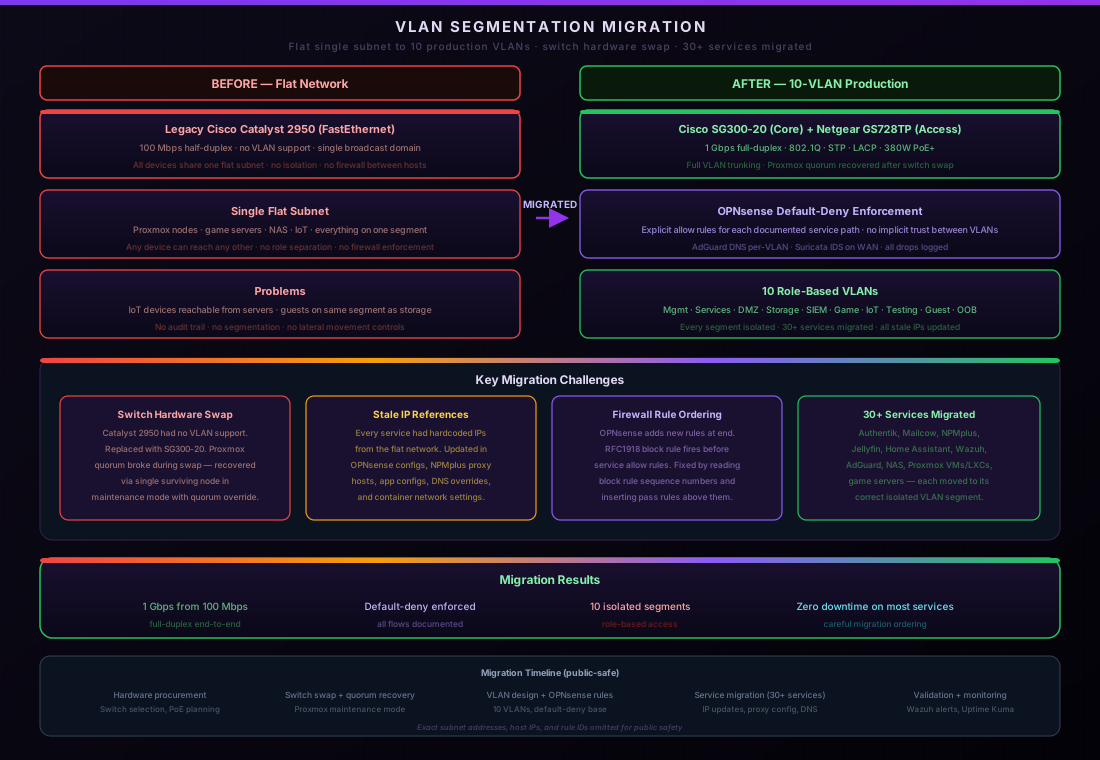
The key security decisions built into the design:
- VLAN 2 (Game Servers) — internet yes, internal blocked. Pelican Panel needed to reach Pelican Wings on the same VLAN, but nothing in VLAN 2 should reach storage, SIEM, or Proxmox.
- VLAN 3 (Servers) — Wazuh receives syslog and agent traffic from all other VLANs. Every VLAN has scoped rules allowing outbound monitoring traffic to Wazuh. VLAN 3 itself can't reach other VLANs beyond what's needed.
- VLAN 4 (Testing) — fully isolated sandbox. Lab VMs and Kali instances get internet access but are hard-blocked from all production VLANs.
- VLAN 5 (IoT) — internet only, RFC1918 blocked. Smart home devices and cameras cannot reach any infrastructure VLAN under any circumstance.
- VLAN 6 (Services) — internal services gated by Authentik SSO. Jellyfin, Headscale, and AI inference run here. NPMplus in VLAN 7 is the only external entry point.
- VLAN 7 (DMZ) — cloudflared and NPMplus only. cloudflared talks to NPMplus. NPMplus only reaches approved backend IPs and ports. Nothing in the DMZ can initiate to management.
- VLAN 8 (Guest) — internet only, hard block on all RFC1918 destinations, captive portal via OPNsense.
- VLAN 9 (Network Services) — Tailscale subnet router and Scanopy network scanner. Tailscale provides remote admin access to all VLANs; Scanopy is scoped to VLAN 10 access only so broad discovery isn't open to all VLAN 9 traffic.
- VLAN 10 (Management) — admin PC, OPNsense, Proxmox nodes, switches. The only VLAN allowed to initiate connections to everything else. No service VLANs can reach VLAN 10 unless explicitly allowed.
- VLAN 20 (Storage) — no internet initiation. VLAN 10 and Proxmox nodes reach storage ports; storage devices get DNS and NTP but can't initiate back into the lab.
Phase 1 — The Switch Swap That Broke Everything
The legacy switching was a pair of Cisco Catalyst 3750V2 switches — 100 Mbps FastEthernet to everything. Both were replaced with a Cisco SG300-20 core switch and a Netgear GS728TP PoE access switch, both gigabit. The physical swap was quick. The aftermath wasn't.
The new switches came up with default configs. The legacy cloudflared DMZ VLAN wasn't trunked anywhere. The Proxmox nodes were plugged into the SG300 but the management VLAN wasn't configured on those ports yet. Every service that depended on the network came down immediately.
Restoring cloudflared first
The first priority was getting public ingress back. cloudflared was on the legacy DMZ VLAN, but that VLAN wasn't tagged on the required SG300 ports. Fix: add the DMZ VLAN to the SG300 VLAN database, tag it on the OPNsense and Proxmox-facing trunks, confirm the LXC gets its DHCP lease, and verify the Cloudflare tunnel registers:
! Cisco SG300 — restore legacy DMZ path for cloudflared
vlan database
 vlan [legacy-dmz-vlan]
 exit
interface [proxmox-facing-trunk]
 switchport trunk allowed vlan add [legacy-dmz-vlan]
interface [opnsense-facing-trunk]
 switchport trunk allowed vlan add [legacy-dmz-vlan]
copy running-config startup-config
After applying: cloudflared could reach its DMZ gateway, the Cloudflare tunnel registered, and public services came back online.
Proxmox quorum failure
The bigger problem: Proxmox corosync had already been configured to use the management VLAN addresses (static management addresses for the three Proxmox nodes) but the management VLAN wasn't tagged on the SG300 ports facing nodes 2 and 3 — only one node trunk had it. Corosync uses multicast on a shared VLAN to maintain quorum. Without management VLAN reachability, the cluster showed 1/3 nodes and all cluster operations were blocked.
The fix required identifying exactly which physical switch ports connected to each Proxmox node using CDP/LLDP, then adding the management VLAN tag to those ports:
! Confirm ports via LLDP
show lldp neighbors detail

! Public-safe labels: Proxmox trunks and OPNsense trunk
interface range [proxmox-node-trunks]
 switchport trunk allowed vlan add [management-vlan]
interface [opnsense-facing-trunk]
 switchport trunk allowed vlan add [management-vlan]
copy running-config startup-config

! Verify quorum restored
pvecm status
# Quorum information
# Node votes: 3
# Expected votes: 3
# Total votes: 3
# Quorum: YES
Phase 2 — VLAN Cutover: 30+ Services
With the cluster healthy and public services restored on the legacy addresses, the actual VLAN migration could begin. Every service needed to move from its old flat-network address to its new role-based VLAN address. This wasn't just changing addresses — every dependency had to be updated at the same time or services would break the moment the network location changed.
The dependency chain
For each service the update chain was:
- Set DHCP reservation in OPNsense with the new VLAN address
- Update the LXC/VM network config in Proxmox (VLAN tag on the bridge interface)
- Reboot or reconfigure the container to pick up the new address
- Update OPNsense Unbound DNS host override to point the subdomain to the new service location
- Update NPMplus proxy host backend to the new service location
- Update any service-to-service configs (Authentik URLs, Jellyfin NFS mounts, etc.)
- Verify via firewall logs that the rule allowing that traffic existed
Doing all 30+ services by hand through the OPNsense and Proxmox UIs would have taken days and been error-prone. Instead, the DNS overrides and NPMplus backends were updated in bulk via the OPNsense API:
# Update Unbound DNS host overrides via OPNsense API
# Each service subdomain gets a sanitized private target

curl -sk -u "$KEY:$SECRET" -X POST \
  https://[opnsense-mgmt-ip]/api/unbound/settings/addHostOverride \
  -H "Content-Type: application/json" \
  -d '{"host":{"enabled":"1","hostname":"auth","domain":"masternazz.com",
       "rr":"A","server":"[sanitized-service-target]","description":"Authentik SSO"}}'

# Repeat for approved service subdomains, then apply:
curl -sk -u "$KEY:$SECRET" -X POST \
  https://[opnsense-mgmt-ip]/api/unbound/service/reconfigure
Services that needed special handling
Most LXC containers were straightforward — change VLAN tag, reboot, pick up the new address, update DNS. A few required more work:
Authentik: OPNsense had Authentik configured as both an LDAP
auth server and an OIDC provider. Both configs had hardcoded service addresses. Updated via the
diag_backup.php config restore mechanism (since direct writes to
/conf/config.xml require root access that the API account doesn't have).
Jellyfin media stack: The NFS mount from Synology was still pointed at the old flat-network address. After Synology moved to the storage VLAN, the NFS export had to be re-added, and the Proxmox storage definition updated. The Docker bind mounts inside the LXC then picked up the correct path.
Proxmox Backup Server: The Thecus NAS running PBS needed its network interface reconfigured from the legacy flat subnet to a static address on the storage VLAN, the SG300 port set to the storage access VLAN, and the PBS storage target in Proxmox updated to the new private address.
Wazuh SIEM: Every other VLAN needed firewall rules allowing outbound to Wazuh for agent registration and log forwarding. These rules were added per-interface so each VLAN could reach Wazuh without having general inter-VLAN access.
Windows Server 2025: Moved to the server VLAN and the Wazuh agent was installed via WinRM to start forwarding Windows event logs into the SIEM.
Phase 3 — Firewall Rules
OPNsense uses a default-deny policy — if there's no rule allowing traffic, it's blocked. Every VLAN needed a minimal set of rules:
- Allow DNS to the OPNsense gateway (AdGuard Home on the management interface)
- Allow Wazuh agent/syslog traffic to the Wazuh manager
- Allow outbound internet where appropriate
- Block RFC1918 destinations for untrusted VLANs (game, guest, IoT, testing)
- Explicit allow rules for specific service-to-service paths
The most important rules are the inter-VLAN paths for DMZ egress. NPMplus in the DMZ needs to reach only the approved backend groups:
! Public-safe OPNsense firewall rule model — DMZ egress
# NPMplus -> approved internal-service backends only
allow  src=[reverse-proxy-host]  dst=[approved-service-backends]

# NPMplus -> approved game-server backends only
allow  src=[reverse-proxy-host]  dst=[approved-game-backends]

# NPMplus -> approved management web backends only
allow  src=[reverse-proxy-host]  dst=[approved-management-web-backends]

# cloudflared can ONLY talk to NPMplus — nothing else in DMZ
allow  src=[tunnel-host]  dst=[reverse-proxy-host]
The DMZ implicit deny catches anything NPMplus tries to reach that wasn't explicitly whitelisted. If a new backend service is added, it needs a matching firewall rule before NPMplus can proxy to it.
Blockers Hit Along the Way
Proxmox routing conflict
After the management VLAN was configured, some connections to legacy flat-network devices (Cisco switch, AP) started failing from Proxmox. Root cause: a stale manual IP in the legacy flat-network range had been added to the management VLAN bridge interface) during earlier testing. This caused Proxmox to route all traffic destined for legacy management devices out the management VLAN interface instead of the native bridge, where the physical legacy devices actually were. Fix: remove the stale address from the management VLAN interface.
Synology NAS — didn't survive port move
Moving the Synology NAS switch port from the legacy network to the storage VLAN required the DSM network settings to already be configured with the target storage VLAN address before the port move — otherwise the NAS goes silent the moment the port VLAN changes. The lesson: update the device address first (while still reachable on the legacy network), then move the switch port. The Synology migration required logging into DSM while still on the legacy network, configuring the static address for the storage VLAN, and only then moving the SG300 port.
NPMplus backend updates
NPMplus stores proxy host configs as nginx conf files on disk. When every service address changed, all 18+ proxy host backends needed updating. Rather than editing each one through the NPMplus UI, the nginx configs were patched via sed and nginx reloaded — but NPMplus regenerates configs on changes, so the correct approach was updating through the NPMplus API or UI so the database stayed in sync with disk.
VLAN 1 couldn't be retired immediately
Even after most services migrated, VLAN 1 stayed live because of out-of-band management hardware — the IBM M4 IMM2 (IPMI/remote console for firstmoon) was still on the legacy flat network and needed physical access to reconfigure. Legacy VLAN 1 remains as a migration zone until OOB cards are moved to the management VLAN.
The End State
From start to finish this took roughly two weeks of iterative work across multiple sessions. The final production state:
- 10 active VLANs, each on its own private role-based subnet
- Proxmox 3-node cluster healthy — 3/3 quorum on the management VLAN
- All 22 VMs and LXCs assigned to their correct VLANs with production addresses
- DNS host overrides updated — all
*.masternazz.comsubdomains resolve to correct private targets - NAT and remote-service policy updated where required
- NPMplus proxy backends updated to new private targets
- OPNsense firewall rules — default-deny, explicit allows per path
- Wazuh receiving logs from every VLAN via per-VLAN agent rules
- Storage fully isolated in a dedicated storage VLAN — Synology, QNAP, Thecus/PBS all isolated
- Switching at 1 Gbps — SG300-20 core, Netgear GS728TP PoE access
Key Takeaways
Map dependencies before cutting over. Every service has at least 3–5 things that need updating when its network location changes: DHCP reservation, DNS, reverse proxy backend, any application configs that reference it by address, and firewall rules. Missing one keeps the service broken even after the addressing is right.
Bulk API updates beat the UI. Updating 25 DNS overrides and 18 proxy backends one at a time through a web UI takes hours and introduces typos. OPNsense and NPMplus both have APIs. Writing a script that applies all changes atomically and can be re-run is faster and leaves a record of what changed.
Hardware swaps during a migration are risky. Replacing the switches mid-migration added a full extra phase of work — re-trunking all VLANs, recovering quorum, restoring the DMZ path for cloudflared. If the switch hardware had been swapped after the VLAN design was validated on the old hardware, the transition would have been cleaner. Order matters.
Device-by-device NAS migrations. Network devices that don't have a console (switches excepted) need their address changed in software before the switch port moves. The Synology NAS taught this lesson the hard way — configure the target address in DSM first, then move the port.
Default-deny firewall forces you to document traffic flows. Every path that needs to work has to become an explicit rule. That's annoying during setup but it means you always know exactly which services can talk to which — no accidental cross-VLAN bleed.
Related Pages
Gigabit Switching & PoE+ Deployment
The Cisco SG300-20 core + Netgear GS728TP access switch architecture that replaced the legacy 3750V2 pair.
View project ->OPNsense Gateway
The OPNsense firewall enforcing default-deny rules across all 10 VLANs with Suricata IDS and AdGuard DNS.
View project ->Proxmox Cluster
The 3-node Proxmox cluster whose quorum was restored during the VLAN 10 cutover.
View project ->Enterprise VLAN Segmentation
The project page for the full 10-VLAN design — VLAN map, security posture, SVG architecture diagram, and employer context.
View project ->