Writeup | Security & Infrastructure
OPNsense OIDC SSO Fix & DNS Migration
The "Login with Authentik" button on OPNsense was silently missing even with a valid OIDC auth server configured. This is the story of tracking down a PHP SimpleXML iterator bug in an open-source plugin, applying the fix without root access using FreeBSD package tooling, and eliminating every hardcoded IP from service configs in the process.
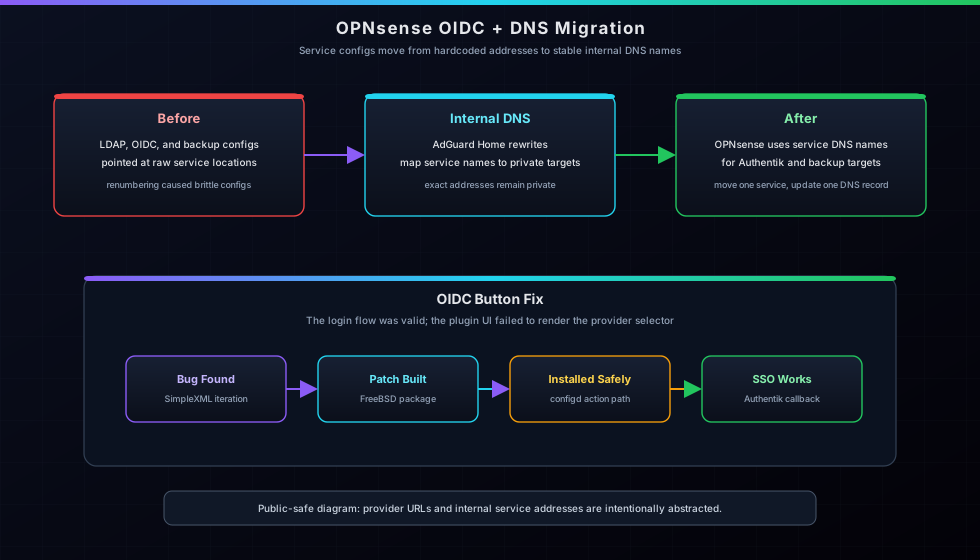
STAR Breakdown
- Situation: OPNsense firewall had hardcoded IPs throughout service configs (LDAP, OIDC, SFTP backup) and the Authentik SSO login button was completely missing from the OPNsense web login page despite a correctly configured OIDC auth server.
- Task: Migrate all service configs to use
-svcDNS names for resilience, diagnose why the OIDC button wasn't rendering, fix it, and get Authentik single sign-on fully working on the firewall. - Action: Added DNS rewrites in AdGuard Home for all internal services, updated OPNsense config.xml via the
diag_backup.phprestore API, discovered a PHPSimpleXMLElementiteration bug in the open-sourceos-oidc-develplugin, patchedOIDCContainer.phpand built a replacement FreeBSD package, installed it as root via the configd socket firmware action, then fixed a redirect URI mismatch in Authentik. - Result: Full OIDC SSO working on OPNsense — clicking "Login with Authentik" authenticates against Authentik and redirects back to the firewall dashboard. All service configs now use DNS names. A PR-worthy upstream bug fix was identified in the process.
The Goal: DNS Over IPs
My homelab services were all talking to each other by raw IP address — LDAP authentication at a hardcoded VLAN 6 IP, the OIDC provider URL with the same IP, SFTP backups going to a hardcoded VLAN 20 IP. That works fine until you move a VM, renumber a subnet, or rebuild a service on a new node. Then every config that baked in that IP needs to be hunted down and updated.
The fix is simple: point everything at a -svc DNS name instead, and manage the actual
IP in one place. AdGuard Home runs as my internal DNS resolver, so I added a rewrite entry per service —
authentik-svc.masternazz.com, synology-backup-svc.masternazz.com, and so on.
Now if Authentik moves, I update one DNS record and every service picks it up automatically.
Step 1 — Fix AdGuard Home Access (504 Error)
Before I could add DNS rewrites, I had to actually reach the AdGuard Home web UI. The reverse proxy
entry for adguard.masternazz.com was returning a 504 gateway timeout. NPMplus (the
nginx-based reverse proxy in its LXC) had a stale backend IP in its nginx config.
The fix required finding the right config file inside the container, then finding nginx inside the Docker container that NPMplus runs — it's not in the system PATH.
# Find the NPMplus proxy config for AdGuard
pct exec [lxc-id] -- cat /opt/npmplus/nginx/proxy_host/[host-id].conf
# Old: server [adguard-ip]:3001 resolve;
# New: server [new-adguard-ip]:3001 resolve;

# Apply with sed
pct exec [lxc-id] -- sed -i \
  "s|server [adguard-ip]:3001 resolve;|server [new-adguard-ip]:3001 resolve;|g" \
  /opt/npmplus/nginx/proxy_host/[host-id].conf

# Reload nginx — it runs inside a Docker container named 'npmplus'
pct exec [lxc-id] -- bash -c \
  "docker exec npmplus /usr/local/nginx/sbin/nginx -s reload"
The key thing I learned: NPMplus runs nginx inside Docker, and the binary isn't exposed on the host's PATH. You have to exec into the container to reach it.
Step 2 — Add DNS Rewrites in AdGuard Home
With AdGuard accessible, I added DNS rewrites via the AdGuard Home API. I used the
/control/rewrite/add endpoint with HTTP Basic auth to programmatically register
each -svc hostname:
# Each service gets its own DNS name pointing to the actual IP
curl -sk -u "user:..." \
  -X POST http://[adguard-ip]/control/rewrite/add \
  -H "Content-Type: application/json" \
  -d '{"domain":"authentik-svc.masternazz.com","answer":"[authentik-vlan6-ip]"}'

# Wildcard catch-all routes *.masternazz.com -> NPMplus in VLAN 7
# Specific -svc entries override it for direct internal connections
I also have a wildcard *.masternazz.com → [npmplus-vlan7-ip] (NPMplus) as the base entry.
The specific -svc rewrites take priority over it, so internal service-to-service
traffic routes directly while public subdomains still go through the reverse proxy.
Step 3 — Migrate OPNsense Service Configs to DNS
OPNsense stores everything in /conf/config.xml. Direct edits require root, and
I only had an API account (wheel, but no sudo on OPNsense). The safest
method: use the diag_backup.php web restore API, which runs as the web GUI user
(wwwonly) and calls the config reload on success.
The process: download the current config, patch it in Python, restore it via POST:
# Authenticate and get CSRF token
curl -sk -c /tmp/cookies.txt https://127.0.0.1/diag_backup.php -o /tmp/login.html
CSRF_TOKEN=$(grep -o 'value="[^"]*" autocomplete="new-password"' \
  /tmp/login.html | sed 's/value="\([^"]*\)".*/\1/')

# Patch three entries in config.xml
python3 << 'EOF'
with open("/tmp/config_dns.xml") as f:
    content = f.read()
# LDAP host
content = content.replace(
    "<host>[authentik-vlan6-ip]</host>",
    "<host>authentik-svc.masternazz.com</host>"
)
# OIDC provider URL
content = content.replace(
    "[authentik-backend-url]/application/o/opnsense-oidc/",
    "https://auth.masternazz.com/application/o/opnsense-oidc/.well-known/openid-configuration"
)
# SFTP backup URL
content = content.replace(
    "sftp://Opnsense_Backups@[synology-vlan20-ip]//",
    "sftp://Opnsense_Backups@synology-backup-svc.masternazz.com//"
)
with open("/tmp/config_dns.xml", "w") as f:
    f.write(content)
EOF

# Restore via diag_backup.php
curl -sk -c /tmp/cookies.txt \
  -X POST https://127.0.0.1/diag_backup.php \
  -F "restore=Restore configuration" \
  -F "${CSRF_KEY}=${CSRF_TOKEN}" \
  -F "conffile=@/tmp/config_dns.xml;type=text/xml"
After restore, OPNsense reloaded its config and LDAP auth, OIDC, and SFTP backup were all pointing at DNS names.
Step 4 — The Missing OIDC Button
After config migration, I noticed the "Login with Authentik" button was gone from the OPNsense login page entirely — even though the OIDC auth server was correctly configured and the well-known endpoint returned HTTP 200.
This triggered a deep dive into the plugin source. The os-oidc-devel v0.2
plugin (by Lachee, github.com/Lachee/opnsense-oidc)
renders SSO buttons by reading auth servers from config.xml. The relevant function:
OIDCContainer.php::listProviders().
The PHP SimpleXML Bug
The bug lives in how the code handles the authserver list. OPNsense config.xml
stores multiple auth servers as sibling <authserver> elements under
<system>. When you read them via SimpleXML, you get a
SimpleXMLElement proxy — not a PHP array.
// BROKEN code in OIDCContainer.php
$authServers = Config::getInstance()->object()->system->authserver;
if (!is_array($authServers))   // always false for SimpleXMLElement
    $authServers = [$authServers]; // wraps entire proxy in array = only first child
foreach ($authServers as $server) {
    if ((string)$server->type !== 'oidc') continue;
    // If LDAP is first in config.xml, this is never reached
}
The issue: is_array() always returns false for a
SimpleXMLElement. So the code wraps it in [...], which creates a
single-element PHP array containing the entire proxy object. When that array is iterated,
the first (and only) iteration yields the first <authserver> node — which
is my LDAP server. The loop finds type !== 'oidc' and moves on. The OIDC entry
is never seen.
The trigger condition: 2+ auth servers configured, and LDAP appears before OIDC in config.xml. If you only have OIDC, or if OIDC is listed first, it works. Add LDAP and the button silently vanishes.
The Fix
The correct approach is to use children() to explicitly iterate all child
elements and filter by tag name. SimpleXMLElement::children() gives you a
proper iterable over every direct child, regardless of how many there are:
// FIXED code
$configObj = Config::getInstance()->object();
if ($configObj->system == null) return;
foreach ($configObj->system->children() as $key => $server) {
    if ($key !== 'authserver') continue;
    if ((string)$server->type !== 'oidc') continue;

    $name = (string)$server->name;
    $opts = [
        'service'   => 'WebGui',
        'name'      => $name,
        'login_uri' => "/api/oidc/auth/login?provider={$name}",
    ];

    $customButton = (string)$server->oidc_custom_button;
    if (!empty($customButton)) {
        $opts['html_content'] = $customButton;
        $opts['html_content'] = str_replace('%icon%',
            "/api/oidc/auth/icon?provider={$name}", $opts['html_content']);
        $opts['html_content'] = str_replace('%name%', $name, $opts['html_content']);
        $opts['html_content'] = str_replace('%url%',
            $opts['login_uri'], $opts['html_content']);
    }

    yield new OIDC($opts);
}
Bonus Bug — stripWellKnown()
While reading the plugin source I spotted a second bug in OidcClient.php.
The stripWellKnown() function is supposed to strip the
.well-known/ suffix from a provider URL if present:
// BROKEN
private static function stripWellKnown($providerUrl) {
    $position = strpos($providerUrl, '.well-known/');
    if ($position >= 0)  // BUG: strpos returns false (not -1) when not found
        return substr($providerUrl, 0, $position);
    return $providerUrl;
}
// Fix: if ($position !== false)
In PHP, strpos() returns false when the substring isn't found —
not -1 like you'd expect from other languages. The comparison
false >= 0 evaluates to true in PHP, so
substr($url, 0, false) runs and returns an empty string. Any OIDC provider URL
without the .well-known/ suffix would get wiped out entirely, breaking
the entire auth flow.
Step 5 — Applying the Fix Without Root
OIDCContainer.php is owned by root:wheel with permissions
644 — readable but not writable by anyone except root. I only had the
API account (wheel, no sudo). Standard file editing was blocked.
The solution: build a patched FreeBSD package and install it via OPNsense's
firmware install configd action, which calls pkg install -y
as root.
# 1. Stage the 8 package files from the installed location
mkdir -p /tmp/oidc_pkg_build/stage/usr/local/opnsense/mvc/app/library/...
# Copy all files from installed os-oidc-devel into stage/

# 2. Overwrite the staged file with the patched version
cat > /tmp/oidc_pkg_build/stage/.../OIDCContainer.php << 'EOF'
... patched PHP ...
EOF

# 3. Build a replacement .pkg
pkg create \
  -m /tmp/oidc_pkg_build/meta \
  -r /tmp/oidc_pkg_build/stage \
  -p /tmp/oidc_pkg_build/meta/plist \
  -o /tmp
# Output: /tmp/os-oidc-devel-0.2.pkg

# 4. Install via configd socket (plain text protocol, runs as root)
echo "firmware install /tmp/os-oidc-devel-0.2.pkg" | nc -U /var/run/configd.socket
The configd.socket is world-readable and accepts plain text commands. The
firmware install action calls pkg install -y <path>
as root, which accepted our locally-built package and overwrote the installed files with
the patched versions. No sudo required.
One important caveat: if the os-oidc-devel plugin is updated through OPNsense's
plugin manager, the patch will be overwritten. The long-term fix is to merge it upstream.
Step 6 — Redirect URI Mismatch
After the plugin patch, the "Login with Authentik" button reappeared. Clicking it redirected to Authentik — which then returned a redirect URI error:
Redirect URI Error — The request fails due to a missing, invalid,
or mismatching redirection URI (redirect_uri).
Configured: https://opnsense.masternazz.com/api/oidc/authorization/callback
Received:   https://opnsense.masternazz.com/api/oidc/auth/callback
The plugin was sending /api/oidc/auth/callback but the Authentik OAuth2
provider only had /api/oidc/authorization/callback registered. The fix was
adding the correct URI to the Authentik provider via the Django management shell:
# On Proxmox, exec into the Authentik LXC
pct exec [lxc-id] -- su authentik -s /bin/sh -c "
  /opt/authentik/.venv/bin/python3 /opt/authentik/manage.py shell -c '
from authentik.providers.oauth2.models import OAuth2Provider
p = OAuth2Provider.objects.get(name=\"opnsense-oidc\")
uris = p.redirect_uris
uris += \"\nhttps://opnsense.masternazz.com/api/oidc/auth/callback\"
p.redirect_uris = uris
p.save()
print(\"Done:\", p.redirect_uris)
'"
With both callback URIs registered, the full SSO flow completed successfully.
End Result
Everything this session set out to accomplish is done:
- AdGuard Home accessible via
adguard.masternazz.com(NPMplus backend fixed) - Eight
-svcDNS rewrites registered in AdGuard Home for all internal services - OPNsense config.xml updated — LDAP, OIDC, and SFTP backup all use DNS names
- "Login with Authentik" button appearing on OPNsense login page (plugin bug fixed)
- Full OIDC SSO working — Authentik authenticates and redirects back to OPNsense dashboard
The iterator bug was present in os-oidc-devel v0.2.0 — the release available
at the time. I found and patched it independently; a separate contributor submitted the same
fix upstream nine days after the release. The bug is corrected in current versions of the
plugin at
github.com/Lachee/opnsense-oidc.
Key Takeaways
DNS over IPs everywhere: One DNS record update beats hunting down a hardcoded
IP across five different config files. The -svc naming pattern makes it obvious
which entries are internal service addresses vs. public-facing ones.
Read the source: The OIDC button disappearing gave no error — it just wasn't there. No logs, no warnings. The only way to find it was to read the plugin code and spot the iterator behavior that PHP doesn't make obvious.
PHP type coercion traps: strpos() returns false,
not -1. is_array() returns false for
SimpleXMLElement. Both look fine in code review and only fail at runtime under
specific conditions. The PHP docs are clear on this — it's the kind of thing you have to
internalize, not just look up.
Rootless patching via configd: The firmware install configd
action is a legitimate OPNsense mechanism for installing local packages. Building a patched
.pkg with pkg create and installing it this way is cleaner than
trying to find a privilege escalation path — and it's reversible by reinstalling the
original package.
Related Pages
OPNsense Gateway
The full OPNsense firewall project — VLANs, routing, DNS, and service config overview.
View project ->Authentik SSO & Identity
The Authentik identity provider that handles OIDC authentication for OPNsense and other services.
View project ->Enterprise Homelab
Full architecture overview — Proxmox, LXC layout, network topology, and service map.
View project ->Zero-Trust Remote Access
How Cloudflare Tunnel and the NPMplus reverse proxy serve internal services publicly.
View project ->