Writeup | Networking & Security
Guest VLAN Captive Portal Enforcement
Built and validated a guest network that forces new clients through an OPNsense captive portal, gives them an isolated guest DHCP lease, allows internet access only after acceptance, and blocks internal management, storage, and service VLANs.
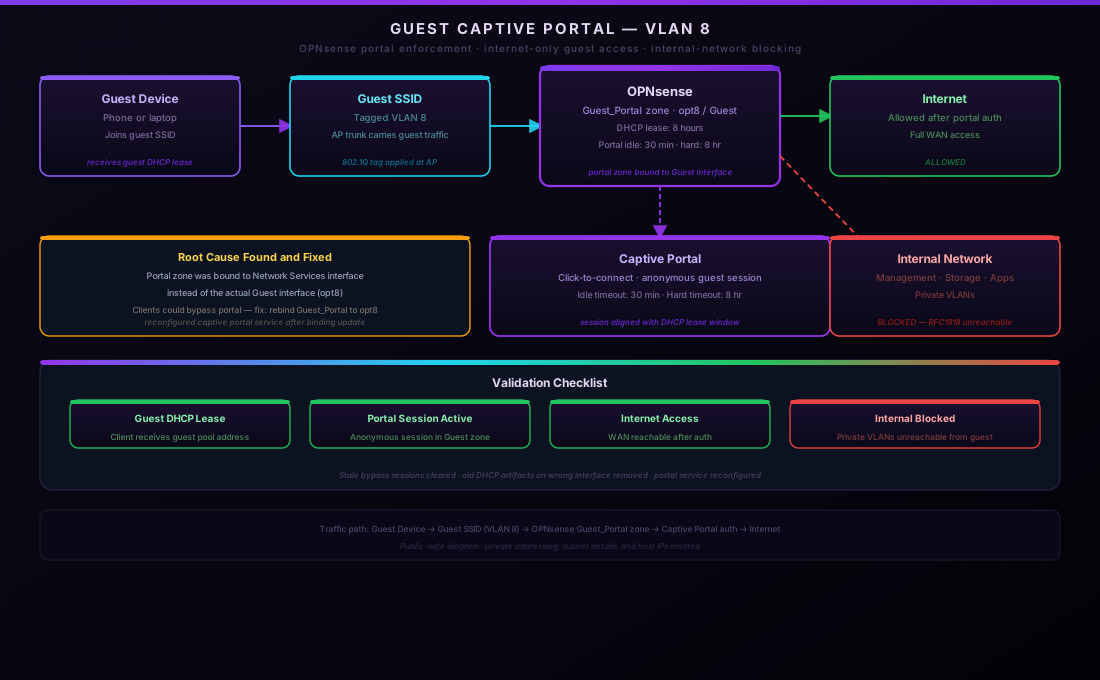
STAR Breakdown
- Situation: The homelab needed a real guest network, not just a separate WiFi name. Guest clients should get internet access, but they should not be able to reach Proxmox, OPNsense management, NAS storage, internal apps, or other private VLANs.
- Task: Build an OPNsense-backed captive portal for the Guest VLAN, validate that fresh clients hit the portal, and prove that DHCP, DNS, portal sessions, and firewall isolation all line up.
- Action: Verified switch trunking and UniFi SSID tagging, fixed the captive portal zone binding from the wrong interface to the actual Guest interface, cleaned stale DHCP artifacts, aligned the DHCP lease with the portal hard timeout, and cleared old bypass sessions.
- Result: A fresh mobile client joined the Guest SSID, received a guest lease, hit the portal, authenticated as an anonymous guest session, and retained only internet access. Stale VLAN 9 bypass sessions were removed so the portal state matches the intended design.
The Goal
The goal was not only "make guest WiFi work." The goal was to model the way a real office or school guest network should behave: visitors can get online, but the guest network is not trusted. It should be easy for a visitor to connect, easy for the admin to validate, and difficult for a guest client to accidentally or intentionally reach internal infrastructure.
The design uses a dedicated Guest VLAN carried from the firewall through the switching fabric to the access point. OPNsense owns the gateway, DHCP, DNS handling, firewall rules, and captive portal zone. The AP only tags the traffic correctly; OPNsense enforces the policy.
Architecture
The traffic path is simple on purpose:
- A phone or laptop joins the Guest SSID.
- The AP tags the client into the Guest VLAN.
- OPNsense gives the client a Guest DHCP lease and DNS path.
- Before authentication, web traffic is intercepted by the captive portal.
- After acceptance, the client gets internet access while private/internal destinations remain blocked.
The portal timers are aligned with the client lease model: the captive portal has a 30-minute idle timeout and an 8-hour hard timeout, while the Guest DHCP pool leases for 8 hours. That keeps a guest device from holding a long DHCP lease after the portal session policy has expired.
The Bug: Correct VLAN, Wrong Portal Interface
The hardest part was that most of the configuration looked right. The Guest VLAN existed. The AP SSID was tagged. DHCP could hand out addresses. The portal service was running. The firewall rules existed. But clients could still connect without being forced through the portal.
The root cause was the OPNsense captive portal zone binding. The portal was attached to the Network
Services interface instead of the Guest interface. In the UI, labels can make this easy to miss if the
interface handle is wrong underneath. The fix was to update the portal zone so Guest_Portal
binds to the Guest interface, then reconfigure the captive portal service.
# Public-safe summary of the fix
Guest_Portal.before.interfaces = network-services-interface
Guest_Portal.after.interfaces  = guest-interface

reconfigure captiveportal
verify service status == running
After the binding was corrected, a fresh mobile client on the Guest SSID appeared as an anonymous portal session in the Guest zone.
DHCP and Session Cleanup
The same wrong-interface history also left behind stale DHCP and portal artifacts. There was an old Guest range/options/tag attached to the Network Services interface, plus old bypass sessions created during testing. Those were removed so future troubleshooting would not be polluted by stale state.
| Item | Final State | Why It Matters |
|---|---|---|
| Portal zone | Bound to Guest interface | Captive portal enforcement applies to actual guest clients. |
| Guest DHCP lease | 8 hours | Matches the portal hard-timeout window. |
| Idle timeout | 30 minutes | Inactive guests age out without waiting all day. |
| Old bypass sessions | Removed | Validation reflects real portal behavior, not old test exceptions. |
Validation
The validation used both live client behavior and firewall-side evidence:
- A fresh iPhone test connected to the Guest SSID and was forced through the captive portal.
- The client received a Guest VLAN DHCP lease from the expected guest pool.
- OPNsense showed an anonymous guest portal session for that mobile client.
- The only other persistent captive portal session is the expected gateway/allowed-address entry.
- Stale Network Services bypass sessions were disconnected after the successful client test.
- Guest VLAN rules remain internet-only, with internal/private networks blocked.
For a portfolio page, the important point is not the private IP address. The important point is that the control loop is complete: SSID tagging, DHCP, DNS, portal enforcement, session tracking, and firewall isolation all agree.
What This Demonstrates
This project is small compared with a full VLAN migration, but it demonstrates a lot of practical network-administration skill. Captive portals involve multiple layers: wireless controller tagging, switch trunks, DHCP scopes, DNS behavior, firewall rules, portal sessions, and timeout policy. If any one layer points at the wrong interface, the user experience looks like "it just connects."
The fix came from not trusting surface-level labels and checking live state: interface handles, generated DHCP config, active sessions, and service status. That is the same troubleshooting pattern I use across the rest of the homelab.
Related Work
Projects connected to the guest network and firewall design.