Writeup | CTF / Competition
CyberLaunch USF 2026
Florida's largest state-sponsored high school CTF — hosted by Cyber Florida at the University of South Florida. This is my recap of the competition format, the workflow I used, and what it actually felt like to do offensive security work under a timer for the first time.
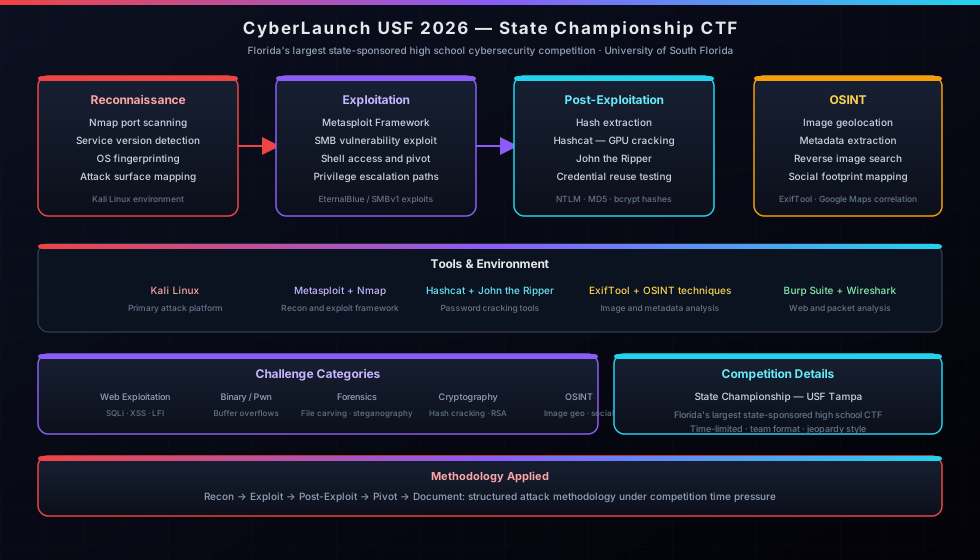
STAR Breakdown
- Situation: Competing in Florida's largest state-sponsored high school CTF State Championship at the University of South Florida.
- Task: Compromise multiple target machines (Windows XP/7 legacy systems) and solve complex OSINT challenges under a strict 4-hour timer.
- Action: Implemented a systematic recon-to-root workflow: Nmap for discovery, Metasploit for SMB exploitation, and Hashcat for offline password cracking. Applied visual geolocation techniques for OSINT.
- Result: Successfully gained shell access to multiple target environments and extracted critical flags, validating homelab-developed skills under high-pressure conditions.
The Setup
CyberLaunch runs a November virtual qualifier and an in-person State Championship in April at USF. I qualified through the virtual round and competed at the Tampa campus for the State Championship. The format was a capture-the-flag competition — find flags hidden across a set of target machines and challenges, score points, repeat until time runs out.
Each competitor needed two laptops: one running the CTF environment and one free for research. Everything was allowed — documentation, Google, AI tools, anything. That's actually more realistic than most exam environments. Real security work isn't done from memory; it's done with the right tools and the ability to find and apply information quickly.
The Target Machines
The CTF included multiple Windows machines as targets — a Windows XP box, a Windows 7 box, and at least one more. Older Windows versions are classic CTF targets because they carry well-documented vulnerabilities, particularly around SMB, that are straightforward to exploit with the right tools once you identify them. They're also what you'd realistically find in legacy environments at small businesses — which made the whole thing feel relevant rather than just academic.
The Workflow
Step 1 — Reconnaissance with Nmap
Every engagement starts with knowing what you're looking at. Nmap was the first tool — running service version scans against the target machines to see what ports were open, what services were running, and what OS signatures came back. On older Windows machines, SMB on port 445 almost always shows up, and seeing that immediately tells you where to start looking for known vulnerabilities.
Step 2 — Vulnerability Research (OSINT)
Once the services were identified, the next step was research. What known CVEs apply to this service version? Is there a Metasploit module for it? This is where the second laptop earned its keep — cross-referencing Nmap output against vulnerability databases and documentation while keeping the attack machine free. SMB vulnerabilities on unpatched XP and Windows 7 are well documented, and finding the right module was mostly a matter of knowing how to search.
Step 3 — Exploitation with Metasploit
Metasploit handled the actual exploitation. Set the target, set the payload, run the module, get a shell. When it works it looks almost too easy — but that's the point of a framework like Metasploit. The hard part isn't running the exploit, it's correctly identifying the vulnerability in the first place and configuring the module correctly. Getting a Meterpreter session open on a target machine for the first time in a real competition environment was a genuinely satisfying moment.
Step 4 — Hash Extraction and Cracking
Once inside a machine, the next objective was usually credentials. Dumping password hashes from the SAM database, then taking those hashes offline to crack with Hashcat or John the Ripper. Hashcat uses GPU acceleration for dictionary and brute-force attacks — fast and effective against weak or common passwords. John the Ripper handled some of the other formats. Cracked credentials sometimes unlocked other parts of the challenge or gave access to additional machines on the network.
Step 5 — Flag Hunting
Flags were hidden across the machines — in files, directories, registry keys, and other locations you'd only find by actually poking around inside a compromised system. This is where post-exploitation enumeration mattered: knowing where to look, how to navigate the filesystem from a shell, and how to search for specific content. Each flag found added to the score.
Step 6 — OSINT Image Geolocation
Not everything was network-based. There were also OSINT challenges, including one where the task was to identify the geographic coordinates of a location from an image — no metadata, just visual analysis. Reading landmarks, architecture, street layouts, and environment to narrow down a location. It's a completely different skill from the technical exploitation work but it tests the same core ability: observe carefully, research systematically, and reach a conclusion you can defend.
What It Actually Felt Like
Challenging. The timer creates a kind of pressure that studying at home doesn't replicate — you know the clock is running, other teams are scoring, and every minute you spend stuck on something is a minute not spent finding the next flag. It forces you to make decisions faster than you're comfortable with and move on when something isn't working rather than grinding on it indefinitely.
It also showed me how much the homelab prep mattered. I'd used Nmap and configured services on real hardware before — not just read about it. When you've actually set up a network and watched traffic move through it, the reconnaissance phase makes more intuitive sense. You know what normal looks like, so anomalies stand out.
The OSINT challenge was a reminder that security isn't only technical. Pattern recognition, attention to detail, and knowing how to search systematically are just as important as knowing which Metasploit module to run. A good analyst uses both.
What I'd Do Differently
More deliberate post-exploitation enumeration practice beforehand. Getting a shell is satisfying but I spent more time than I should have figuring out where flags might be hiding once I was already inside. That's a workflow you want to have memorized — a checklist of places to look so you're not improvising under pressure.
I'd also spend more time on OSINT tooling specifically. The image geolocation challenge caught me off guard — not because I couldn't do it, but because I hadn't practiced that category as deliberately as the network exploitation side. Next time it won't be a surprise.
The Bigger Picture
CyberLaunch gave me a clearer picture of what offensive security work actually looks like in practice — the reconnaissance-to-exploitation-to-post-exploitation chain, the role of OSINT alongside technical tools, and how real-world vulnerabilities (unpatched SMB on legacy Windows) show up in structured environments. It's one thing to read about EternalBlue or watch a walkthrough. It's another to run the workflow yourself under competition conditions and get results.
It also confirmed that the homelab work translates. The concepts aren't abstract when you've already configured the hardware they run on.
Related Pages
Wazuh SIEM / XDR
The defensive side — SIEM deployment, endpoint monitoring, and alert triage. The other half of understanding how attacks work.
View project ->SkillsUSA Internetworking
Florida State Champion — 1st Place. The networking fundamentals competition that happened the same month.
View page ->All Writeups
Back to the writeups index — more competition recaps and technical notes.
View all ->Journey & Timeline
The full story — where CyberLaunch fits in the bigger picture.
View timeline ->